Donor Information:
- find any donor by:
- first name or surname
- donor number
- church envelope #
- mailbox #
- street
- postal/zip code
- phone number
- email address
- tax receipt number
- you can enter characters
in non-Latin languages. For example, Chinese and Korean.
You can enter them in any text field.
- records up to four (4) telephone numbers (home, work, cell and FAX) and three (3) email
addresses (home, work and another) for each donor
- store individual and family pictures of <-- NEW!
each person. These are used to do a color photo directory.
- records each donor's
birthday. When entering a birthday the year can be given or omitted.
For example if a donor was born on Mar 25, 1975 you can
enter it as Mar 25 or Mar 25, 1975.
- prints a list of those whose birthday is coming up soon
- records a membership expiry date for charities
- membership expiry date
will be automatically updated when membership fee is received.
- keeps track of when and
how a donor becomes or ceases to be a member
- tracks up to 10 custom one-time events for each donor.
Eg: baptism, confirmation, etc.
- when adding new donors, some fields are
automatically filled
in to match what is common about the last 10 donors. It will
fill in the city, state/province, zip/postal code and donor type.
- checks for duplicate names when adding a new donor
- will check for duplicate donors by looking for either:
- a similar full name, same street, postal/zip code
(similar first names will match, such as
Robert & Bob or Susan & Sue)
- the same last name, street, postal/zip code or
- the same street and postal/zip code
- keeps track of up to sixty (60) customizable donor types or donor characteristics
For example you could set up the following characteristics:
- married
- single
- child
- widowed
- Sunday School Teacher
- Elder
- Deacon
- Usher
- Pastor
- Small Group Leader
- Building Committee
- Missions Committee
- Choir
- plays piano
- plays guitar
- helps with Alpha
- Alpha participant
You would check off the characteristics that apply to each person and
run reports for people with certain characteristics.
- a characteristic for a
donor can be automatically selected or un-selected when certain events
happen. This can then be used to print a letter for that donor.
These are the events that you can pick:
- the donor is added
- the donor starts using numbered envelopes
- the member expiry date changes (used by charities only)
- the donor starts using pre-authorized deposits (P.A.D. or A.C.H.)
- the donor makes their first donation
- the donor type changes. (eg: the donor becomes a member)
- the donor is exported
- the donor is imported
- gives you the option of entering donors without an address
- transfer donors to QuickBooks as customers
Donor Relationships:
- record different kinds of
relationships between donors, such as:
- Family relationships (parent/child, husband/wife)
- Someone is sponsoring someone else.
- One person is praying for someone.
- A person is in authority over another
(eg: elder, small group leader, manager)
- group all the members
of a family together with one of the parents
- keep track of anniversaries
- print labels or letters for anyone whose birthday or anniversary is coming up soon
- print labels or letters for a person who is being sponsored by a donor
Reassigning Church Envelope Numbers:
- church envelope numbers are reassigned in a variety of ways
according to your instructions
- keeps track of the envelope number used in the current and previous year
after they are reassigned
- donors can be sorted by name
or envelope number before re-assigning envelope numbers
- when donors are sorted by
name before re-assigning, you have the option of leaving some
unused numbers between each letter of the alphabet
- envelope numbers can be manually re-assigned
- prints labels for church envelope boxes, sorted by envelope number, name
or mailbox#
Printing Church Envelopes:
- Rather than ordering offering envelopes from <-- NEW
a church envelope company,
print them yourself saving some money.
- If you purchase from a church envelope company, you need to buy extra envelopes
in case new donors want to start using them. When you print your own
this is not necessary - just print them as you need them.
- Prints the date of each week in the year onto each envelope together
with each person's envelope number. For people that start using envelopes
partway through the year, just print the remaining weeks.
- The offering envelope can be formatted anyway you like.
- Envelopes can be customized for each person by showing the top three categories
that each person used.
This may save them from having to write the category name on the envelope.
- Three sample envelope formats are included. If you don't like either of these then
send us a sample in Word® and we'll set
it up for you. The first one is no charge
and any changes after that have a small setup fee.
- A good size to use is #6 (3 5/8" x 6 1/2")
and is available from many office supply companies.
- Some church envelope suppliers also sell blank envelopes.
- Requires the purchase of the Letters/Emails module.
Donations:
- transfer bank deposits to Manager accounting
<-- NEW
- transfer donations and bank deposits to QuickBooks
- dates can be entered as mm/dd/yy
or dd/mm/yy or using the month name
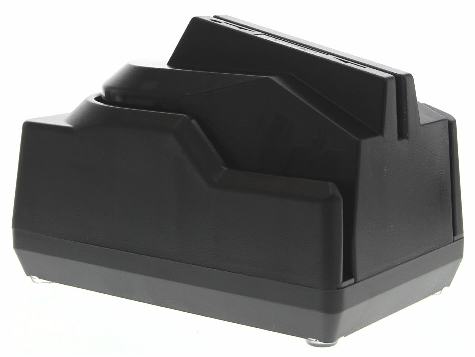 speed up the data entry using a check reader.
You read the check,the donor is
found and you just enter the amount.
We recommend
this reader, which plugs into your USB port.
Order the reader/scanner from one of these suppliers.
speed up the data entry using a check reader.
You read the check,the donor is
found and you just enter the amount.
We recommend
this reader, which plugs into your USB port.
Order the reader/scanner from one of these suppliers.
- an optional unalterable audit trail
(entries cannot be changed once entered, but you can add new donations to adjust the entry)
- the text and boxes on the
donation entry window can be made bigger
so they are easier to see
- enter all the donations received on one date or enter all the
donations for one donor on several different dates
- when entering donations, finds donors by name or church envelope number
- when entering donations, sorts donors by name, by church envelope number
or by the order in which they were entered
- after entering donations on a given date in any order, they can be shown to you
in the same order you entered them in, so you can check them
- records several donations by a donor on the same date
- churches can record
which service or event a person donated at.
Ministries and charities can record which mailing or event a person
is responding to. (ie. source or motivation codes)
- records loose offerings/loose change
- gives you the option of indicating how a donation was made:
by credit card,
debit card, cash, coin, pre-authorized deposits (electronic fund transfers - ACH) or
check (including a check number of up to 10 digits)
- can indicate how many of each bill/coin size was received
- payment method can be setup to default to the one used most often
- enables you to pick your own shortcut keys to enter the payment method
- you can add your own customized payment methods
- a payment method can be non-receiptable
if you receive donations
through any organization which
issues their own tax receipts for those donations
- records donations in which the donor received something in return for their
donation (split receipts)
- records post-dated checks
- records a note or description with each donation
- adds or updates donor information while you are entering donations
- keeps track of up to two hundred (200) donation categories or designations
(this will be increased free of charge if you need more)
- each category can be receiptable or non-receiptable
- a category can be hidden
from donors (ie. it will not be shown on tax receipts,
quarterly statments or mailings) This is useful
for keeping track of credit card or PayPal fees.
- each category can be divided into several sub-categories
- records what currency foreign donors donated with
Pre-authorized Deposits (EFT, ACH, PAD or PAR) / Online Donations:
- automatically enters pre-authorized deposits (ACHs)
on the day of the month or week that the donor chooses
- pre-authorized deposits can be monthly,
bi-monthly, bi-weekly or weekly
- if your bank requires you to upload a file of transactions, Donarius
will create the file for you.
- each donor's banking information (bank #, transit #, account #) will be recorded
in Donarius in an encrypted format.
- Online donations can be imported from your online giving provider.
Donarius is integrated with
these providers so you can import in one step:
PayPal
EpicPay
Vanco
WeShare
Moonclerk
Givelify
Bambora
Tithe.ly
Txt2Give
Pledges:
- records the length of each pledge and how often each donor promises to give,
for example a three year pledge to be given quarterly
- a pledged amount can be given annually, semi-annually, quarterly,
monthly,
weekly or twice a month.
(This frequency can also be a multiple of a month or a week.)
- on tax receipts shows the amount pledged as well as the actual amount given
- on quarterly statements shows the amount pledged, the actual
amount given and how much is needed to fulfill the pledge
- most reports have the option of selecting any combination of:
- donors who gave and pledged
- donors who gave but did not pledge
- donors who did not give but pledged
- donors who neither gave nor pledged
Or one of:
- donors who fall short on their pledges
- donors who fullfilled their pledges
- mail (or email) a reminder letter to donors who fall short on their pledges
- mail (or email) a Thank You letter to donors who fulfilled their pledges
- reports and windows can use another word to indicate a pledge.
For example: promise, committment or estimated giving.
- customized reports can include a pledge reminder chart which
shows how much they:
- pledged per year, month, week, etc.
- should have given from the start of the pledge
- need to give to fulfill their pledge
- pledged for the entire pledge period
- need to give to fulfill the entire pledge
Tax Receipts:
- save paper, envelopes, ink/toner and postage by emailing tax receipts.
The tax receipts are in encrypted PDFs which cannot be altered,
as required by the IRS in the USA and the CRA in Canada.
- To send emails you need the Letters/Emails module.
To create PDFs you need one of these PDF printer drivers:
- eDocPrinter
- Win2PDF
- Bullzip PDF Printer
- PDFWriter (for Macs)
- RWTS PDFWriter (for Macs)
- tracks non-receiptable (non tax deductible) donation categories
- gives you a choice of yearly receipts or 1 receipt per donation
- prints on standard letter size paper or pre-printed forms
- you may omit tax receipts for small amounts
(eg. do a receipt only for
donations of $10 or more)
- shows the name and title of authorized signature
- if a husband and wife
are entered as separate donors, their donations
can be combined onto one tax receipt.
(requires the "Relationships/Families" module.)
- shows the currency used by a foreign donor
- gives you a choice of built-in receipts with a variety
of options or a customized receipt.
- prints a "Receipt Summary" which shows each donor's name, with or without an address,
receipt number and total donated
- you can view the details of any receipt you have issued
- prints a statement for donors that are themselves a charity
(ie. they don't get tax receipts)
- some donors can be setup
to not get tax receipts
- works with any taxation year-end
(for example: Australia's taxation year end is June 30th)
Tax Receipt Options:
- optionally have a cutoff section on the receipt which shows any of
the following:
-donations per quarter and per category
-list of all donations
-list of donations
- optionally shows the donor number or envelope number (in Canada it would
be shown in addition to a receipt number which is required)
- can be setup to print several copies of the same tax receipt per page or
several different tax receipts per page
- can print the organization's logo whereever you want it on the receipt
- can print a message on the tax receipts
- can print a signature which you have previously scanned in
- in addition to the above options which are available on the
built-in receipts, you can design your own receipts so that
they can:
a) have items placed wherever you want
b) include any graphics file
c) have a personalized letter of any length
d) have different font styles, sizes
and colors
e) include any field from the donor
database
f) be personalized for different donor types,
donor characteristics, payment
methods, etc.
- free setup of one customized letter, email or receipt - just email us a sample
(additional ones are $20.00 each)
"Gift-in-Kind" Receipts (for non-monetary donations):
- "Gift in Kind" tax receipts can have a blank line for the
donor to estimate the value
- "Gift in Kind" tax receipts can have zero value on the tax receipt
and still count toward fulfilling a pledge
- "Gift in Kind" receipts can be customized
Reports:
- prints quarterly statements for each donor, in one of two formats:
a) a summary of donations by quarter and category, similar
to the bottom half of a tax receipt or
b) a summary of donations showing each donation in the last quarter and
the previous quarters showing only a total for each quarter
- prints donation statements for each donor, showing each donation for this year
- save paper, envelopes, ink/toner and postage by
emailing statements as PDF files
- To send emails you need the Letters/Emails module.
To create PDFs you need one of these PDF printer drivers:
- eDocPrinter
- Win2PDF
- Bullzip PDF Printer
- PDFWriter (for Macs)
- RWTS PDFWriter (for Macs)
- 'donations by date' report shows the donations received
and/or pledges for a date range,
grouped by day, week, month, quarter or year
- 'donations by donor' report shows each donor and how much
they gave during a date range.
The donors can be sorted by:
- name
- envelope #
- the amount they donated
- the order in which you entered the donations
- the receipt # for one-time
donations
- the type of donor
- the characteristic of the donor
(donors can be grouped by gender when a donor characteristic
identifies gender)
- the frequency in which
they are paying off their pledges
- age and age range
- The settings for a report can be
memorized, so you do not have to reselect your choices.
- prints a donor list
- prints a report of donors with a birthday in a given range.
For example, to show all donors with a birthday in March you would
enter a range of Mar 1 to Mar 31.
- prints color photo directories <-- NEW!
on both sides of standard 8.5" x 11" paper.
The sheets are then stapled together to make a booklet that is 5.5" x 8.5". Each
page is numbered with your choice of headings. You can also have several sections
with different types of donors in each section.
- on church directory you choose
which phone numbers and/or email addresses to show
- prints a bank deposit which shows the total coin, cash and checks being
deposited. Also includes a list of the checks and/or other payment methods
- you can have a different bank
deposit for each service or event.
- if you have a different bank account for some
<-- NEW!
funds or categories, it will
print a separate deposit for each account
- You may have both a US dollar and a Canadian
<-- NEW!
dollar bank account. In this case,
Donarius will automatically do a bank deposit for each account.
Report Options:
- dates can be entered as mm/dd/yy
or dd/mm/yy or using the month name
- reports can be customized by
putting any of the following at
the top or bottom of each page:
- today's date
- current time
- page #
- church/organization's name
- church/organization's address
- a comment or any text
- a logo or image
- reports show donation categories in columns, rows or in the middle of the page
- the order of categories on
reports can be re-arranged as needed
- create customized reports by including only certain donors, based on their:
- donor type
- donor characteristics
- the method of payment for the donation
- why, when or where
they donated (ie. source code)
- reports can be saved to a file for customizing
- works with any fiscal year-end
- reports can default to start on
Jan 1st or start of fiscal year
Mailings:
- keep in contact with your donors by sending them personalized
letters, emails and messages (with app)
- has the potential to increase your church membership, by creating
connections between people and generating interest in upcoming
events with communication targeted to the right people.
For more about how Donarius can help you do this, read
the article we wrote for the Capterra Church Management blog.
- add file attachments to emails
- send html emails with graphics and sound
- emails can be sent from Donarius using your Gmail, Yahoo or AOL email address
and using their SMTP server. Also works with Microsoft emails
(Hotmail, Live and Outlook).
- sends messages to cell phones (with app)
- free setup of one personalized letter, email or message - just email us a sample
(you should be able to setup additional ones on your own)
If you want us to setup the additional ones they are $20.00 each.
- prints labels or envelopes for mailings (envelopes can have
your organization's name pre-printed on it or
Donarius® can
print it for you.)
- prints on any size label sheet or envelope
- re-uses partially used label sheets, starting at the bottom of
the sheet so it will not get stuck in your printer
- finds donors who have not given for a certain period of time, so you
can send them a reminder letter/email
- do a mailing to a certain province/state or a postal/zip code range
- do a mailing for people
having a birthday or anniversary
- do a mailing for people
whose membership or credit card expires soon
- do a mailing for people
who gave a certain amount. The amount can be the total given during a
time period, a single donation or an amount pledged per year.
- gives you the option of sorting by country then postal/zip code or
country then province/state
- counts how many items are going to each unique first part of a postal/zip code
or each province/state
- organizations in the USA
can put a POSTNET barcode on labels and/or envelopes
and so pay less for their postage
- Donarius® can be setup to automatically import
donor info from some other software and send them an email, message or print a letter.
For example, this can be used to send messages. (with app)
Security:
- has two access levels: one for full access and one for limited
access (for example, used by tellers, counters or church secretary)
- you indicate whether tellers are allowed or not allowed to
know who an envelope number belongs to
- you indicate whether tellers are allowed to enter new donors and
view or edit donor information
- tellers are never allowed to see the total donated or the receipt number
- tellers can be limited in terms of how far back they can edit donations
- you specify what kinds of reports tellers are allowed to view and how
far back they can view them
- can be setup for someone
to view/edit only donor information
not any donations. For example, this could be used by the
church secretary.
- you indicate whether tellers may add or edit donation category names
- gives you the option of 2, 3 or 4 signature lines on the bottom of teller reports
- enables you to start Donarius® without having
to enter a password if you don't have any concerns about unauthorized persons using it
Other:
- works over a network for one user at a time
- can be used on multiple computers for one user at a time,
accessing the same data over the Internet,
using DropBox.
To setup Donarius to work with DropBox, move the entire Donarius folder
to the DropBox folder on your desktop. then create a shortcut pointing
to the file DONARIUS.EXE. Anyone else with the same DropBox account
will automatically have the files and software copied to their DropBox folder
on their computer.
- data can also be shared with:
Google Drive,
OneDrive,
Sync,
Good Sync,
Spider Oak or
Team Drive.
Charities in Canada are required by the CRA to store their
data in Canada (i.e. not on US servers) So in Canada you should use either Sync or
Good Sync. Sync has servers in Toronto and Good Sync does not store data on any
server but sends data directly from one computer to another.
- automatically backs up data files to a diskette, memory stick, ZIP drive,
CD-RW or CD-R
(backup to a CD-RW or CD-R, using Donarius, may require an add-on from the company that
developed your CD burner software)
- backups can be to any folder on your computer
- backup folders can have the date
of the backup as part of the name
- backup only the years of data that you want to
- you have the option of deleting old data to save space
on your hard drive
- data can be restored from any drive or folder
- add new donors and new donations entered on a second computer to your data
- view/print reports using data on a backup disk without copying it to your hard drive
- the default printer can be
different from the Windows default printer
- imports donors and donations from:
-delimited text files
-files exported from Membership Plus, Vian
-any church management software that can export data
-Microsoft Access
-Microsoft Excel
-Quickbooks
-Manager accounting
-M.Y.O.B.
-Simply Accounting
- donors and donations can be imported from a report (in a text file)
that lists each donor's donations.
- free importing of your data if you don't want to do it yourself
If your data is in an non-standard format there will be a charge
to convert the data to a text file.
- exports donors and donations to delimited text files, to be used for mail-merges,
transferring info to spreadsheets, selective backups and much more
- choose separate colors for
window background and controls (edit, combo and list boxes)
- runs on Windows 7, 8, 10 or 11.
Also runs on Linux with an emulator.
To install on a Mac use:
PlayOnMac or
Crossover.
|